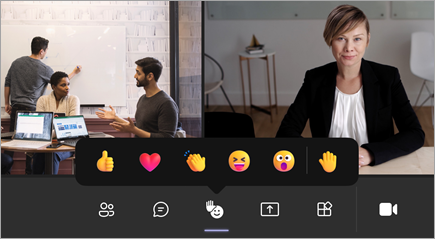
In addition to virtually raising your hand in a Teams meeting, you can express yourself in other ways to help make Teams meetings more inclusive, engaging, and fun!
During your meeting, select React
 in the meeting controls at the top of the meeting view to share your reaction to what's being shared. Choose from a range of live reactions, including:
- Like

- Love

- Applause

- Laugh

- Surprise

Reactions are available in both Teams for web and the Teams desktop app.
Note
Live reactions appear when using filters and backgrounds and in breakout rooms, but not in large gallery view.
Your reaction pops up momentarily at the bottom of your meeting and over your profile picture or video feed.
If you or someone else is sharing content in a meeting, such as a desktop, window, PowerPoint deck, photo, video, or whiteboard, reactions float up from the bottom of the screen for a few seconds. Corresponding reactions also appear on the profile pictures of participants who send reactions.
Note
- If live reactions aren't available, check with the meeting organizer or IT admin to see if the feature has been enabled.
- Meeting organizers can turn off live reactions in participant settings.